> ## Documentation Index
> Fetch the complete documentation index at: https://docs.treasury.sh/llms.txt
> Use this file to discover all available pages before exploring further.
# Manual Accounts
> Track cash, a home, a car, or any account Treasury cannot connect to — so your net worth is complete.
## Overview
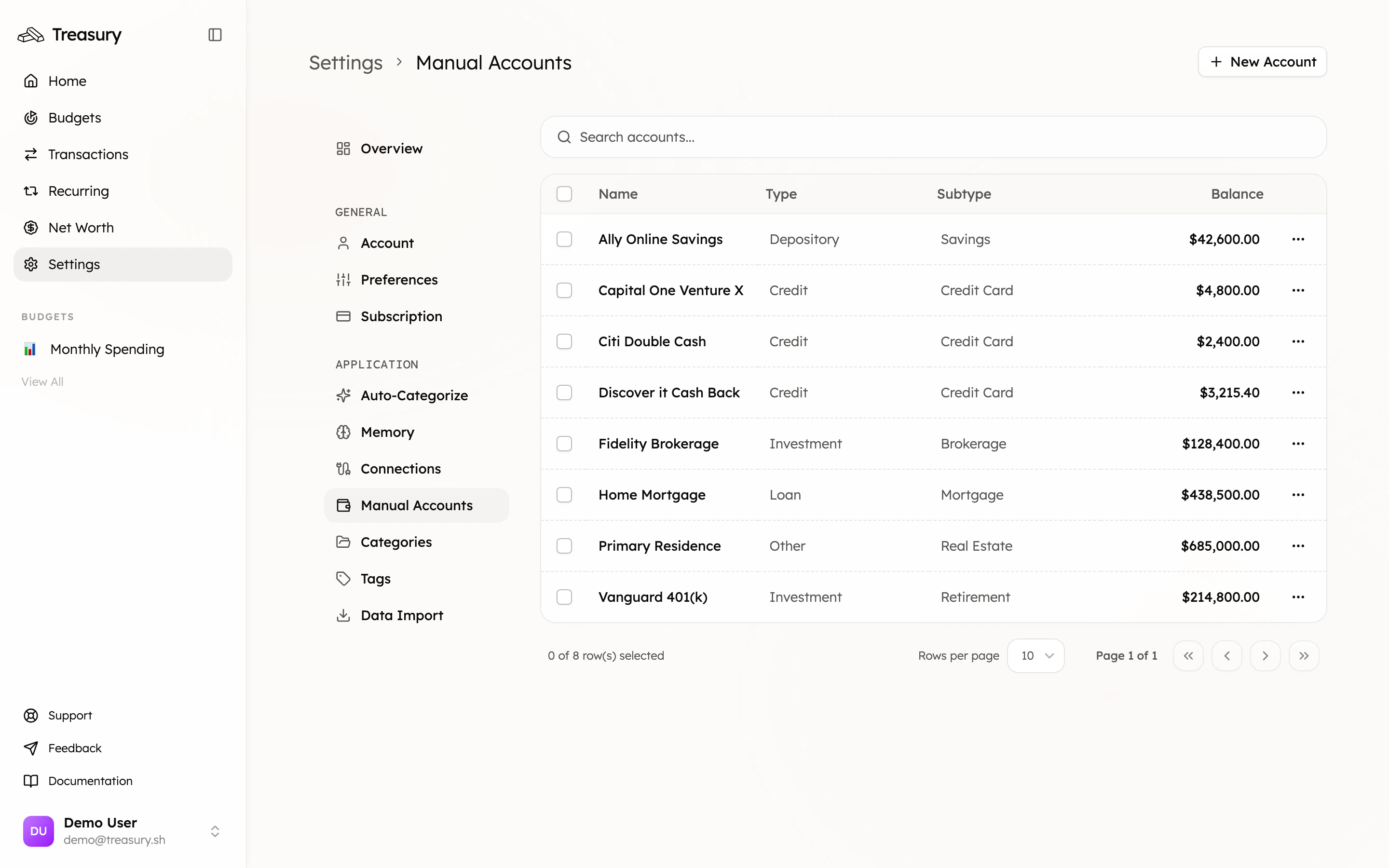
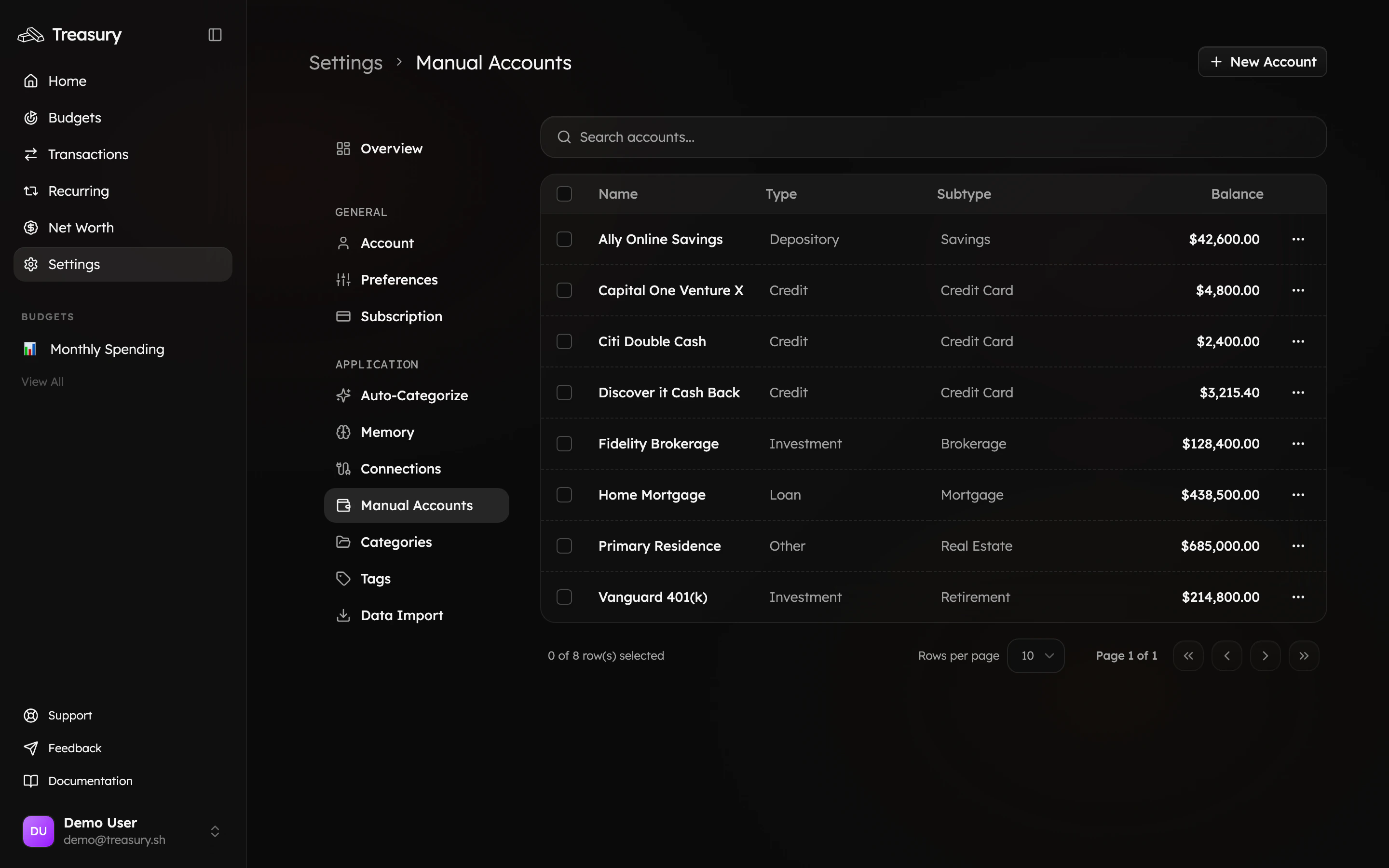
Your manual accounts are found in [Settings > Manual Accounts](https://app.treasury.sh/settings/manual-accounts). This is where you add and update the things that don't connect to a bank — a home, a car, cash, or an unsupported institution — so your [net worth](/core/net-worth) reflects your whole financial life, not just what syncs.
 ## What you can do here
* **Add** assets that don't connect — a home, car, cash, or valuables.
* **Track** balances Treasury can't sync and update them over time.
* **Choose a type** (depository, credit, loan, investment, other) so it counts correctly toward net worth.
* **Edit** and **delete** manual accounts any time.
## What are Manual Accounts?
Manual accounts let you include financial assets and balances in Treasury that aren’t connected through Plaid. They’re perfect for tracking items that still contribute to your **net worth**, even if they don’t exist in a traditional bank or investment account.
You can use manual accounts for:
* **Physical assets** like a home, car, or jewelry
* **Cash on hand** that isn’t in a linked bank account
* **Investments or holdings** not supported by Plaid
* **Closed loans or credit lines** you still want reflected in your history
When creating a manual account, you can set an **initial balance** and manually update it over time as values change — for example, adjusting your home’s estimated value or tracking your cash total.
This helps ensure your **net worth** in Treasury accurately reflects your complete financial picture, not just what’s in connected institutions.
## Adding a Manual Account
To add a manual account, go to [**Settings > Manual Accounts**](https://app.treasury.sh/settings/manual-accounts), then click **New Account** in the top-right corner.
A pop-up will appear where you can enter your account details:
1. **Account Name** — Give your account a clear name (e.g., “Cash on Hand,” “Toyota Corolla,” or “Home Equity”).
2. **Balance** — Enter the current value of the account or asset.
3. **Type** — Choose the type of account from the list below.
4. **Subtype** — Optionally, specify what kind of account it is (e.g., *Checking* or *Car Loan*).
5. Click **Add Account** to save it.
### Account Types
| Type | Description | Example Uses |
| :------------- | :---------------------------------------------------------- | :--------------------------------------------- |
| **Depository** | Accounts that hold money or cash equivalents. | Checking, Savings, Cash on Hand |
| **Credit** | Accounts that represent borrowed money. | Credit Cards, Lines of Credit |
| **Loan** | Long-term borrowed funds you’re repaying over time. | Mortgage, Student Loan, Car Loan |
| **Investment** | Accounts or assets that may appreciate or generate returns. | Brokerage, Retirement Accounts, Crypto Wallets |
| **Other** | Any other asset or account type not covered above. | Home, Car (paid off), Gold Set, Collectibles |
### Subtype
The **Subtype** field lets you add more context within your chosen account type.\
For example:
* If you selected **Loan**, your subtype might be *Student Loan* or *Auto Loan*.
* If you selected **Depository**, you could enter *Cash* or *Savings Account*.
Subtypes are completely flexible — you can name them however best describes your account.
Once created, your manual account will appear alongside your connected accounts in **Net Worth** and can be updated manually anytime.
## Editing a Manual Account
To make updates to an existing manual account, go to [**Settings > Manual Accounts**](https://app.treasury.sh/settings/manual-accounts).
1. Locate the account you’d like to update.
2. Click the **three dots** (`⋯`) on the right-hand side.
3. Select **Edit** from the dropdown.
4. The **Edit Manual Account** window will open. Here, you can update:
* **Account Name** — rename the account for clarity.
* **Balance** — adjust the amount to reflect the current value.
* **Type** — change the account type if needed (e.g., from *Depository* to *Loan*).
* **Subtype** — modify the subtype (for example, *Cash* → *Checking* or *Student Loan* → *Car Loan*).
5. When finished, click **Save Changes** to confirm.
All edits are immediately reflected across Treasury, including in your **Net Worth** and any connected reports.
### Deleting a Manual Account
If you no longer need a manual account, you can remove it at any time.
1. Go to **Settings → Manual Accounts**.
2. Find the account you want to remove.
3. Click the **three dots** (`⋯`) on the right-hand side.
4. Select **Delete**.
5. A confirmation pop-up will appear.
6. Click **Delete** to permanently remove the account.
This action cannot be undone. Once deleted, all associated data for that account will be
permanently removed from Treasury.
Manual accounts are the key to a *complete* net worth. Add your home, car, and any cash or investments Plaid can't reach, then update their balances every month or two to keep the picture accurate.
## FAQ
Connect anything Treasury supports — it stays current automatically. Use a manual account for what can't connect: a home, a car, cash, valuables, or an account at an unsupported institution.
Add it as a manual account with type **Other** and its estimated value. It counts toward your assets in [Net Worth](/core/net-worth). Update the value every so often to keep it accurate.
No — that's the trade-off. Since they aren't connected, you update their balances yourself whenever the value changes.
Yes. Manual accounts sit alongside connected ones in [Net Worth](/core/net-worth), classified as an asset or liability based on their type.
## Related
Prefer automatic syncing? Link the institution instead.
Manual accounts roll into your net worth alongside synced ones.
Add manual transactions to a manual account.
## What you can do here
* **Add** assets that don't connect — a home, car, cash, or valuables.
* **Track** balances Treasury can't sync and update them over time.
* **Choose a type** (depository, credit, loan, investment, other) so it counts correctly toward net worth.
* **Edit** and **delete** manual accounts any time.
## What are Manual Accounts?
Manual accounts let you include financial assets and balances in Treasury that aren’t connected through Plaid. They’re perfect for tracking items that still contribute to your **net worth**, even if they don’t exist in a traditional bank or investment account.
You can use manual accounts for:
* **Physical assets** like a home, car, or jewelry
* **Cash on hand** that isn’t in a linked bank account
* **Investments or holdings** not supported by Plaid
* **Closed loans or credit lines** you still want reflected in your history
When creating a manual account, you can set an **initial balance** and manually update it over time as values change — for example, adjusting your home’s estimated value or tracking your cash total.
This helps ensure your **net worth** in Treasury accurately reflects your complete financial picture, not just what’s in connected institutions.
## Adding a Manual Account
To add a manual account, go to [**Settings > Manual Accounts**](https://app.treasury.sh/settings/manual-accounts), then click **New Account** in the top-right corner.
A pop-up will appear where you can enter your account details:
1. **Account Name** — Give your account a clear name (e.g., “Cash on Hand,” “Toyota Corolla,” or “Home Equity”).
2. **Balance** — Enter the current value of the account or asset.
3. **Type** — Choose the type of account from the list below.
4. **Subtype** — Optionally, specify what kind of account it is (e.g., *Checking* or *Car Loan*).
5. Click **Add Account** to save it.
### Account Types
| Type | Description | Example Uses |
| :------------- | :---------------------------------------------------------- | :--------------------------------------------- |
| **Depository** | Accounts that hold money or cash equivalents. | Checking, Savings, Cash on Hand |
| **Credit** | Accounts that represent borrowed money. | Credit Cards, Lines of Credit |
| **Loan** | Long-term borrowed funds you’re repaying over time. | Mortgage, Student Loan, Car Loan |
| **Investment** | Accounts or assets that may appreciate or generate returns. | Brokerage, Retirement Accounts, Crypto Wallets |
| **Other** | Any other asset or account type not covered above. | Home, Car (paid off), Gold Set, Collectibles |
### Subtype
The **Subtype** field lets you add more context within your chosen account type.\
For example:
* If you selected **Loan**, your subtype might be *Student Loan* or *Auto Loan*.
* If you selected **Depository**, you could enter *Cash* or *Savings Account*.
Subtypes are completely flexible — you can name them however best describes your account.
Once created, your manual account will appear alongside your connected accounts in **Net Worth** and can be updated manually anytime.
## Editing a Manual Account
To make updates to an existing manual account, go to [**Settings > Manual Accounts**](https://app.treasury.sh/settings/manual-accounts).
1. Locate the account you’d like to update.
2. Click the **three dots** (`⋯`) on the right-hand side.
3. Select **Edit** from the dropdown.
4. The **Edit Manual Account** window will open. Here, you can update:
* **Account Name** — rename the account for clarity.
* **Balance** — adjust the amount to reflect the current value.
* **Type** — change the account type if needed (e.g., from *Depository* to *Loan*).
* **Subtype** — modify the subtype (for example, *Cash* → *Checking* or *Student Loan* → *Car Loan*).
5. When finished, click **Save Changes** to confirm.
All edits are immediately reflected across Treasury, including in your **Net Worth** and any connected reports.
### Deleting a Manual Account
If you no longer need a manual account, you can remove it at any time.
1. Go to **Settings → Manual Accounts**.
2. Find the account you want to remove.
3. Click the **three dots** (`⋯`) on the right-hand side.
4. Select **Delete**.
5. A confirmation pop-up will appear.
6. Click **Delete** to permanently remove the account.
This action cannot be undone. Once deleted, all associated data for that account will be
permanently removed from Treasury.
Manual accounts are the key to a *complete* net worth. Add your home, car, and any cash or investments Plaid can't reach, then update their balances every month or two to keep the picture accurate.
## FAQ
Connect anything Treasury supports — it stays current automatically. Use a manual account for what can't connect: a home, a car, cash, valuables, or an account at an unsupported institution.
Add it as a manual account with type **Other** and its estimated value. It counts toward your assets in [Net Worth](/core/net-worth). Update the value every so often to keep it accurate.
No — that's the trade-off. Since they aren't connected, you update their balances yourself whenever the value changes.
Yes. Manual accounts sit alongside connected ones in [Net Worth](/core/net-worth), classified as an asset or liability based on their type.
## Related
Prefer automatic syncing? Link the institution instead.
Manual accounts roll into your net worth alongside synced ones.
Add manual transactions to a manual account.